How to Activate the Software? (Alternative Method)
To activate your software, please first read the
following information and then activate your
software through the Registration form below.
Please note that the software License ID is
unique to each computer and will not change when
you reinstall or upgrade Windows or format your
computer. In other words, if you reinstall your
Windows or format your computer, you will not
have any problems and you can use your software
with the same previous activation code and you
will not need to purchase the activation code
again.
 Please follow the steps below to activate the
software:
Please follow the steps below to activate the
software:
|
First, Download the Demo version of the
software from the
Download section of
the site and install it on your desired
computer.
|
 |
|
Download the FARASA Licensing
file from the link below and unzip
it.
|
|
|
Run the
FARASA Licensing.exe executable
file inside the folder on the computer
on which you want to activate the
software. |
|
|
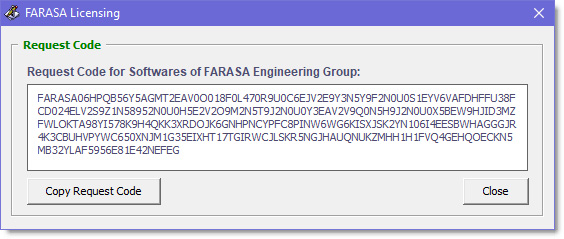
The
FARASA Licensing
window
will appear similar to the image below, where
your
Request
Code
has been Generated.
 |
|
|
Copy this Request Code using the
Copy Request Code
button.
This code must be entered in the
Software Request Code section of the
following
Registration Form
below.
|
|
|
Carefully complete all the fields
of the software
Registration Form
below, and then
submit the information by pressing the
Send Request button.
|
|
|
After reviewing the information you
submitted through the registration form,
activation files and the latest software
update will be sent to the email address
you entered in the registration form,
and after that you will be able to use
all the features of the purchased
software.
|
|
 Registration form for Requesting Activation Code
|
Software Activation Request Form |
|
|
|
Fill out the following registration form
accurately and completely. And then
submit it by the Send Request button in
the end of form. |
|
|
|
|
|
|
|
|
|
|
Also if there are any problems with the above
form, you can download registration form via the
following link.
After completing the form, please send it to our
specified following email address.
 Registration Form.doc
 Contact E-mail:
etabsmate@gmail.com
Contact E-mail:
etabsmate@gmail.com
Contact E-mail:
info@farasaeg.ir
WhatsApp Number:
+989173171373